





Creators don’t want ten apps that don’t talk to each other. They want one smooth ecosystem where video edits, thumbnails, music, scripts, pitches, and presentations flow like water. Apple seems to have heard that loud and clear.
Apple has officially unveiled Apple Creator Studio, a new subscription suite that bundles some of its most powerful creative and productivity apps into one creator-first package. Think of it as Apple putting a ‘studio in your backpack.’ It’s compatible with Mac, iPad and iPhone acting like extensions of the same creative brain.
This isn’t just another product launch. It’s Apple calling out the modern creator economy directly: YouTubers, podcasters, video editors, indie musicians, design-led founders, educators, and even college students who are building careers from content.
So, what’s new, what’s included, and why does it matter (especially for creators in India)? Let’s break it down.
A subscription built for creators
Apple Creator Studio is positioned as a single subscription that gives creators access to:
- Final Cut Pro, Logic Pro, and Pixelmator Pro on Mac and iPad Motion, Compressor, and MainStage on Mac
- Premium templates and intelligent features for Keynote, Pages, Numbers, and later Freeform across iPhone, iPad, and Mac
- It launches with a monthly and yearly price, plus a student/educator plan, and it still keeps the door open for one-time purchases on Mac for those who don’t want subscriptions.
- What stands out is Apple’s messaging: studio-grade power for everyone. Not for Hollywood, not for agencies, but for regular creators who edit reels at 2 AM and export videos between meetings.
- Apple is leaning into a major differentiator: privacy. Most AI-powered editing tools today come at the cost of your data. Apple is making it clear that many intelligent features work on-device, using Apple silicon performance rather than sending everything to the cloud.
Also read: Meta Threads Overtakes X in Mobile Usage as Audience Shifts
Video creation gets faster and smarter
Final Cut Pro is being upgraded in ways that directly match how creators work in 2026. Not slow cinema timelines. High-volume, high-speed content pipelines.
Here are the big highlights:
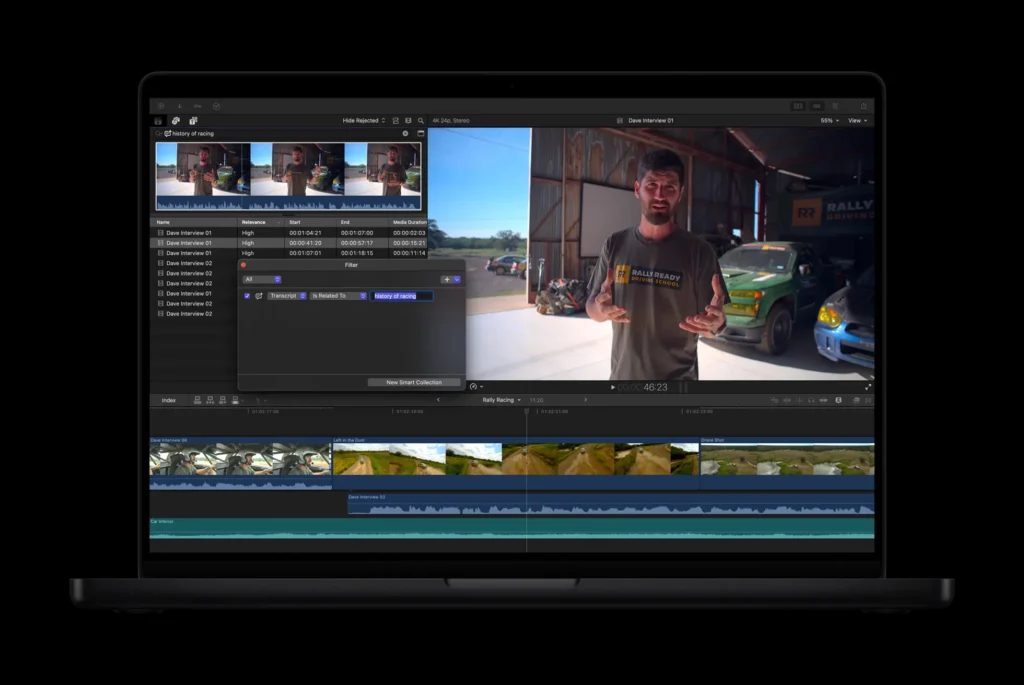
- Transcript search: If you edit podcasts, interviews, panel chats, or brand conversations, you know the real struggle is not editing, it’s finding the moment. Transcript Search lets you type a phrase and jump directly to relevant soundbites. That’s a gamechanger for editors working with hours of footage.
- Visual search: It helps you locate clips by what’s happening. Instead of scrubbing endlessly, creators can search for an object or action, then instantly find matching moments across footage. Great for travel content, product demos, fashion transitions and BTS montages.
- Beat detection: This one is for reels editors and hype-video creators. Beat Detection displays beats, bars, and parts of a song right on the timeline. Your cuts can finally stop looking ‘almost synced’ and start hitting like they mean it.
- Montage maker: This feature uses AI to auto-create a montage based on your best visual moments, then lets you adjust pacing, align to music, and even reframe horizontal footage into vertical using Auto Crop. In short: your iPad becomes a mini post-production assistant.
- Motion and compressor: For many creators, these have traditionally felt ‘too pro’ or too technical. But Apple is packaging them as part of the same suite, which means creators can slowly level up, without needing a separate ecosystem.
Motion’s Magnetic Mask also stands out because it makes isolating and tracking subjects easier, even without a green screen. That’s huge for creators who want cinematic effects without cinematic budgets.
Also read: YouTube’s New Policy: Monetizing Sensitive Content
Logic Pro goes AI-powered
Music isn’t just for musicians anymore. In the creator economy, every niche needs sound: YouTube intros, podcast beds, brand jingles, reel transitions, and background scores.
Synth Player brings session-player energy to electronic music. It’s like having a skilled synth performer available on-demand. You can control complexity and intensity, and it’s designed to help creators build tracks faster without needing deep music theory.
Chord ID makes music theory simpler
Chord ID can convert audio or MIDI into a usable chord progression. That means creators can take a casual melody idea and turn it into a full structure quickly.
Creators always need safe, usable sounds that won’t trigger copyright headaches. Apple-designed Producer Packs with loops, samples, patches, and drum sounds add a lot of ready-to-use production value.
Plus, iPad users get Quick Swipe Comping, and new Music Understanding tools that let you search loops using natural language. No tags. No hunting. Just describe what you want.
This suite isn’t just helping creators make content. It’s helping them own their sound.
Pixelmator Pro on iPad is quietly a big deal. If you design thumbnails, posters, decks, Instagram carousels, media kits, product mockups, or pitch visuals—Pixelmator Pro coming to iPad changes your daily workflow.
It arrives with:
- A touch-optimised interface
- Full Apple Pencil support
- A Layers sidebar for complex design building
- Selection tools, masks, and composition features like Auto Crop
- Power tools like Super Resolution and Deband
- A new Warp tool and Warp-powered product mock-ups (for subscribers)
This matters because most creators don’t want to ‘sit at a desk’ to design. They want to design on the go. And iPad has always been a creator’s favourite device that somehow lacked a complete desktop-class image editor at this level.
Now it has one.
Also read: Instagram’s Meta AI Reel Translation is Coming to India
The real creator flex
Apple is also upgrading Keynote, Pages, Numbers and Freeform through Apple Creator Studio. Not by locking the apps, but by adding premium content and intelligent tools.
A Content Hub provides curated photos, graphics, and illustrations. Premium templates upgrade how your decks and docs look instantly, which matters for creators pitching to brands.
And yes, Apple openly mentions using generative models from OpenAI to create or transform images in these apps. That’s Apple blending in AI creation, while still wrapping it inside the ‘Apple workflow.’
For creators who constantly juggle proposals, scripts, budgets, storyboards, and brand reports, this is not fluff. This is speed.
Frequently Asked Questions
What is Apple Creator Studio?
Apple Creator Studio is a subscription suite that bundles creative apps like Final Cut Pro, Logic Pro, and Pixelmator Pro with premium tools for Apple’s productivity apps.
Which apps are included in Apple Creator Studio?
It includes Final Cut Pro, Logic Pro, Pixelmator Pro (Mac and iPad), Motion, Compressor, MainStage (Mac), plus premium content in Keynote, Pages, Numbers and later Freeform.
Is Apple Creator Studio good for YouTubers and influencers?
Yes. Features like Transcript Search, Beat Detection, and Montage Maker make editing faster and more social-media friendly.
Can I use Apple Creator Studio on iPad?
Yes, key apps like Final Cut Pro, Logic Pro and Pixelmator Pro are available on iPad with touch-first experiences.
Can I buy the apps without subscribing?
Yes. Apple still offers one-time purchases for several Mac versions like Final Cut Pro, Logic Pro, Motion and Pixelmator Pro.